



LLM Testing Checklist: 50 Validations Before Production
ByPratik Patel
Mar 19, 2026
LLM testing checklist with 50 validations to ensure accuracy, safety, and reliability before deployment. Avoid hallucinations and production risks.

Testers turn to AI for mobile app testing to navigate the complexity of modern apps with smarter, faster, and more reliable methods. AI tools can learn from data, predict outcomes, and automate tasks, which means they can efficiently handle the repetitive and intricate aspects of testing, allowing testers to focus on more strategic activities.
This blog will serve as your guide. We’ll uncover mobile app testing best practices, decode their significance, and take a look into possible future trends.
First and foremost, we need to understand what mobile testing is, the different types of it, and the challenges faced by traditional testing methods.
Mobile testing is a procedure for evaluating the quality, functionality, usability, and consistency of mobile applications. The goal is to provide an optimal user experience by identifying and reporting potential issues before the application reaches the end-user.
There are several types of mobile testing, each addressing a specific aspect of the application.
Now that we’ve covered the overview of different types of mobile testing, let’s look at the various challenges faced while approaching mobile testing with traditional approaches.
The power of AI lies in its ability to learn, adapt, and improve over time, and the user using it will be able to bring out the highest potential of AI if it is used correctly.
The fusion of AI mobile testing is a significant advancement in the field of mobile software testing. Here’s why this fusion is so important:
Now let’s get down to the main section of this blog. By following these best practices, you can utilize AI in testing to get the most out of your efforts.
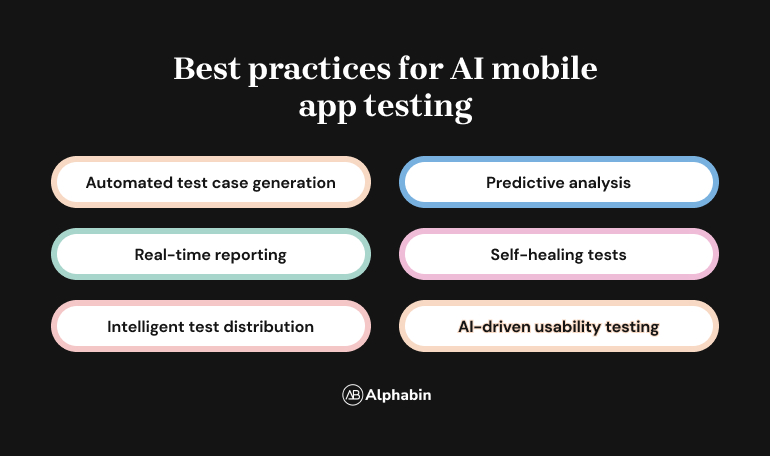
For mobile automation testing, AI can generate test cases based on your specific mobile app testing requirements and user behavior predictions. This involves training an AI model with your requirements and user interaction data, which it then uses to generate relevant test cases for your automation testing.
How to do it:
AI tools can predict potential problem areas in the application. This involves using AI for AI testing, where it analyses historical test data and identify patterns that might indicate potential issues.
How to do it:
Let’s consider an open-source tool like TensorFlow for predictive analysis in mobile testing.
import tensorflow as tf
from tensorflow import keras

# Assume X_train is your preprocessed historical test data and y_train are the corresponding results
model = keras.Sequential([
    keras.layers.Dense(64, activation=tf.nn.relu, input_shape=(X_train.shape[1],)),
    keras.layers.Dense(64, activation=tf.nn.relu),
    keras.layers.Dense(1)
])

model.compile(optimizer=tf.optimizers.Adam(),
              loss='mean_squared_error',
              metrics=['mean_absolute_error', 'mean_squared_error'])

model.fit(X_train, y_train, epochs=50)# Assume X_test is your new test data
predictions = model.predict(X_test)Analyze the Predictions: Analyze the predictions to identify potential problem areas in the application. You might need to set a threshold to decide which areas are likely to be problematic.AI can provide real-time updates about the testing process. This involves using AI-driven reporting tools to analyze test results in real time and provide instant feedback.
How to do it:
One of the most powerful features of artificial intelligence(AI) in test maintenance is the ability to create self-healing tests. These are tests that can automatically update themselves when changes are detected in the application.
How to do it:
Use tools like Testim.io or Mabl, which offer self-healing test capabilities. They use machine learning algorithms to understand the structure and elements of your application, allowing them to adapt to changes and keep your tests up-to-date.
Remember, the key to successfully integrating AI into your testing efforts is to understand the capabilities of AI and choose the right tools that fit your specific needs.
AI can enhance parallel execution by intelligently distributing tests based on various factors, such as their past execution time, complexity, and failure rate. This ensures optimal utilization of resources and can lead to a significant reduction in overall testing time.
How to do it:
Implement AI-driven mobile testing tools (which vary based on your requirements) that offer intelligent test distribution. These tools use machine learning algorithms to analyze historical test data and distribute the tests in a way that optimizes the testing process.
AI can significantly enhance usability testing by analyzing user interactions and providing insights into the user experience. This involves using AI to evaluate how users interact with the application and identify areas where the user experience can be improved.
How to do it:
Use open-source usability testing tools in your testing process and rely on their AI power to provide insights into user actions, helping you improve the usability of your app.
These tools can analyze user interactions with the Android app and provide insights into the user experience, helping you identify areas for improvement.
There are several myths and points every quality enthusiast must know before leveraging (artificial intelligence)AI into the comprehensive testing testing process.
As we are reaching the end of the blog, let’s take a look at our predictions for future trends and innovations in mobile testing.
Blockchain-based testing
With the rise of decentralized apps (dApps), there’s a need for specialized testing methodologies. Blockchain-based testing will ensure the integrity, security, and functionality of these dApps.
Quantum computing
As quantum computing becomes more accessible, it could revolutionize mobile testing. Quantum algorithms can potentially process vast amounts of data and complex computations faster, making it possible to test every possible user interaction and scenario.
In summary, we navigated through mobile testing, its challenges, and the role of artificial intelligence(AI) in overcoming them. We discussed best practices for integrating AI into mobile app testing services and key points to consider before implementation. We also explored future trends like blockchain testing and quantum computing.
If you’re interested in AI and mobile testing, and how it can benefit your app’s development process, consider partnering with us, a Mobile app testing service provider that uses AI-powered tools.

Founder and CEO
Pratik Patel is the founder and CEO of Alphabin, an AI-powered Software Testing company. He has over 10 years of experience in building automation testing teams and leading complex projects, and has worked with startups and Fortune 500 companies to improve QA processes. At Alphabin, Pratik leads a team that uses AI to revolutionize testing in various industries, including Healthcare, PropTech, E-commerce, Fintech, and Blockchain.
ByPratik Patel
Mar 19, 2026
LLM testing checklist with 50 validations to ensure accuracy, safety, and reliability before deployment. Avoid hallucinations and production risks.
ByPratik Patel
Mar 18, 2026
Build reliable AI features with structured LLM testing. Learn how to prevent hallucinations, measure accuracy, automate evaluations, and scale testing with CI for production-ready AI systems.

ByPratik Patel
Mar 16, 2026
Learn how to test LLM applications effectively. Discover key metrics, evaluation frameworks, and strategies to detect hallucinations, bias, and performance issues.