

Most teams think they are testing their LLM features. They run a few prompts during development, check that the responses look reasonable, and then ship the feature.
Three weeks later, a user enters a strange edge case into the input field. The model confidently gives an answer that is factually wrong, slightly offensive, or completely unrelated. The team spends two days trying to understand what went wrong. In the end, they realize there was no real test coverage, only quick visual checks.
This is the gap that professional AI/LLM testing services help close. It is not because your engineers are not skilled. The real reason is that testing AI applications requires a very different approach from testing traditional software.
This guide explains what actually breaks in production, how to build proper tests around those risks, and what a mature LLM testing setup looks like for teams that want to ship reliable AI features.
The Honest Problem with How Most Teams Test LLMs
Here is the simple truth: most of what people call "LLM testing" is really just trying a few prompts and calling it quality assurance.
A developer builds a new AI feature, tests it with ten prompts, sees good results, and merges the pull request. That is not testing. That is simply hoping everything will work.
Real AI/LLM testing services follow a systematic process. They run hundreds or even thousands of test cases. The tests run automatically. They detect problems when a prompt changes or when the model provider updates the model. They measure quality with clear numbers that teams can track over time, not just personal impressions.
This matters because LLM behavior is not stable. The same model can give different answers when the input changes slightly. Model providers also release updates that change how responses are generated. A prompt that worked perfectly last month might start giving slightly wrong answers today because of changes you did not make and cannot see.
Without automated LLM testing, there is no reliable way to detect these changes.
{{cta-image}}
What Actually Breaks in Production AI Applications
Forget theoretical failure scenarios for a moment.
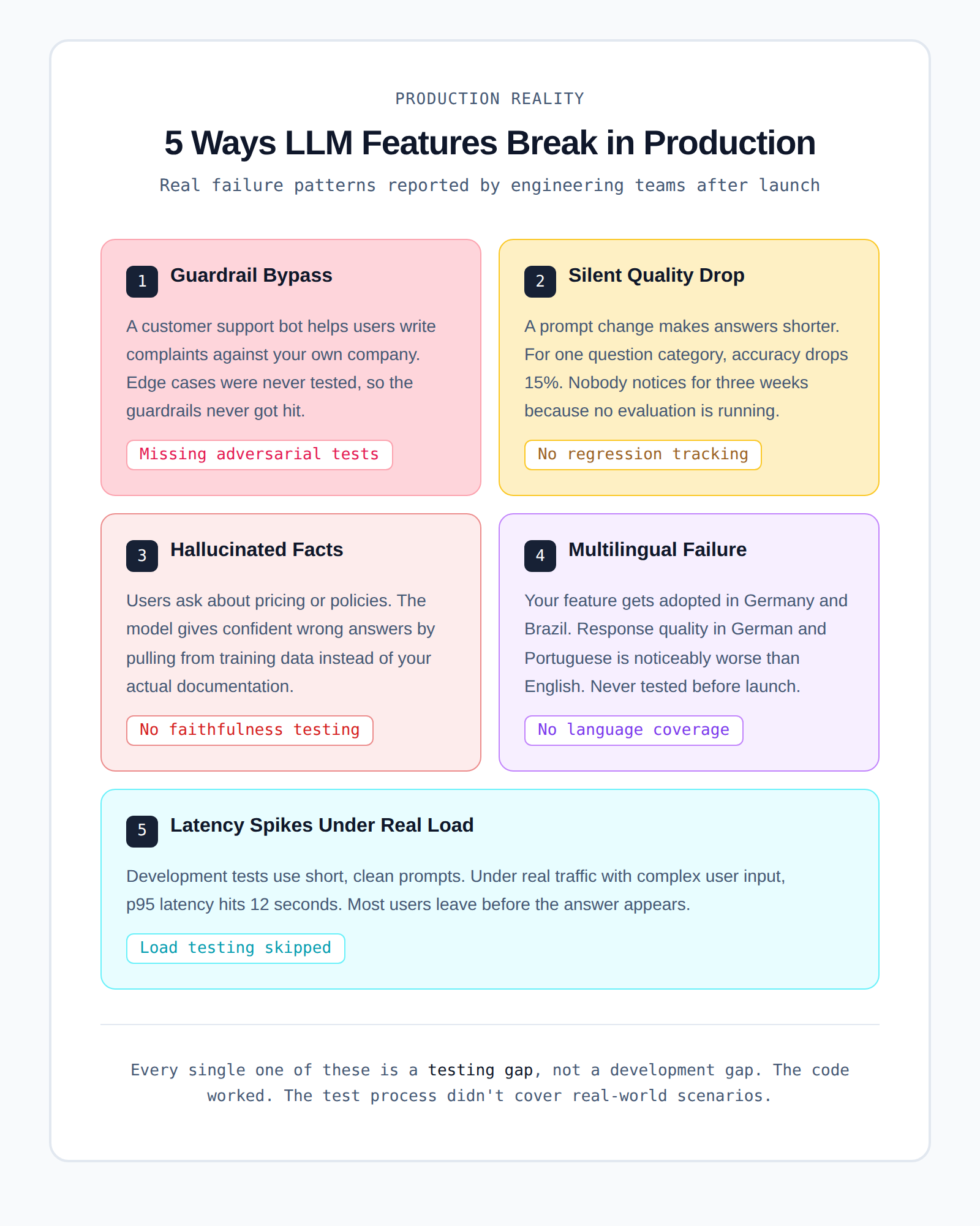
Here are the real problems engineering teams often see after they launch AI features:
1. The model answers questions it should refuse
- You build a customer support chatbot.
- A user asks the bot to help write a complaint letter against your own company.
- The model happily helps instead of refusing.
- This usually happens because guardrails were never tested against these edge cases.
2. Response quality drops after a prompt change
- Someone updates the system prompt to make responses shorter.
- For one category of questions, answer quality drops by about 15%.
- No one notices the change for several weeks.
- The reason is simple: there was no systematic LLM evaluation running in the background.
- Users slowly stop using the feature.
3. The model invents product information
- Users ask questions about pricing, features, or company policies.
- The model provides confident answers that are partly or completely wrong.
- Instead of using your documentation, it pulls information from its training data.
- This is called a hallucination, and it happens more often than many teams expect.
4. The model works in English but fails in other languages
- Your AI feature starts getting users from Germany and Brazil.
- When people ask questions in German or Portuguese, the answers are worse than in English.
- Nobody tested multilingual performance before launch.
5. Slow responses ruin the user experience
- During development, responses appear fast with simple test prompts.
- In production, users send longer and more complex questions.
- Under real traffic, p95 latency increases to around 12 seconds.
- Many users leave the page before the answer even appears.
Every one of these problems is usually a testing gap, not a development gap.
- The code worked as expected.
- The testing process simply did not cover real-world scenarios.
The Six Things Your AI/LLM Testing Services Setup Needs to Cover
Good LLM testing is not just one type of test.
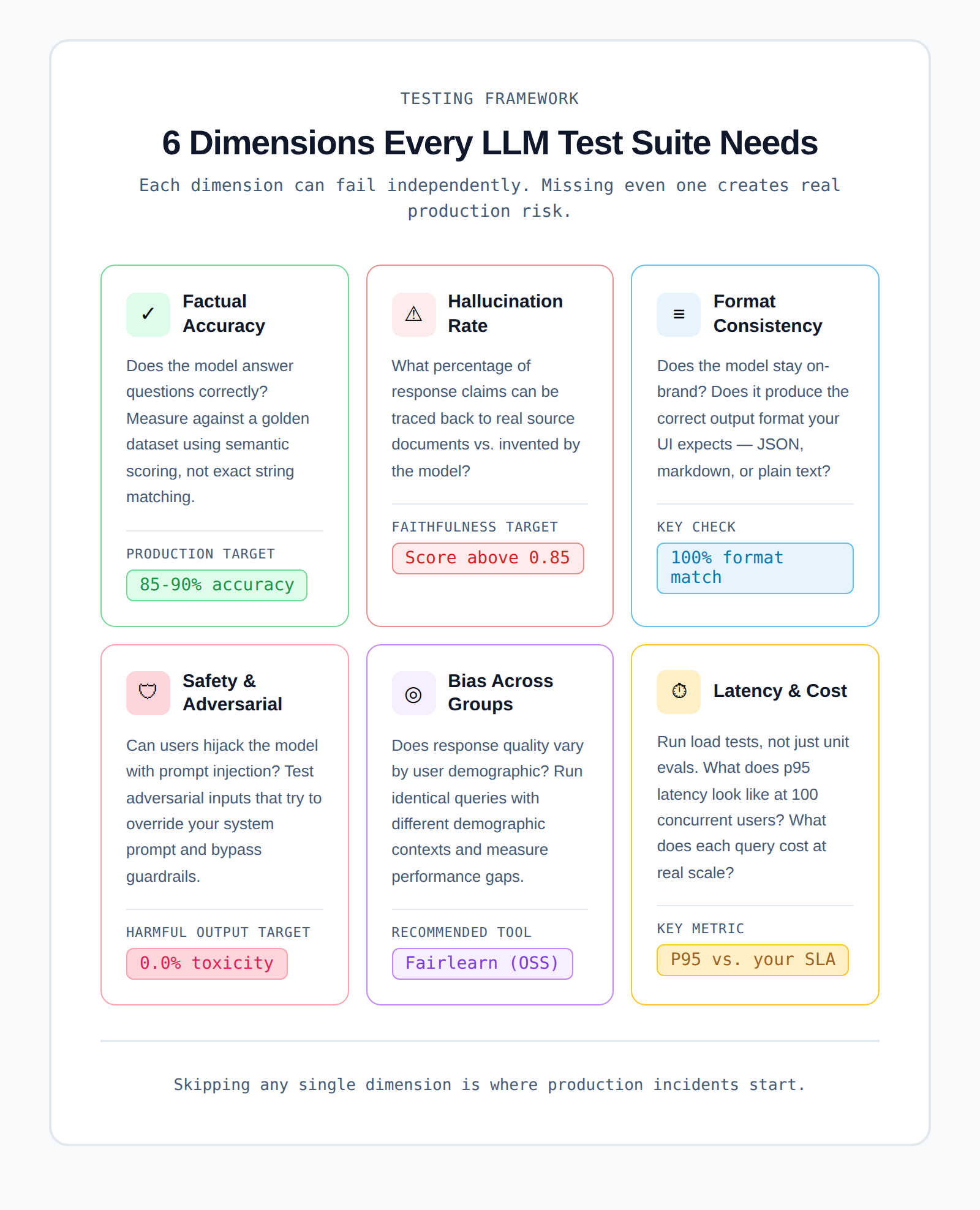
It involves six different areas, and each one needs its own testing approach.
1. Factual Accuracy
This checks whether the model gives correct answers.
1. Create a benchmark dataset.
- This dataset contains question and answer pairs.
- The questions should represent what real users will ask.
2. Run the model against these questions.
- Measure how often the answers are correct.
- Instead of exact word matching, use semantic similarity scoring because LLM responses rarely match word-for-word.
3. For a 2026 baseline:
- Aim for 85–90% accuracy on your core use cases before launching.
- If accuracy is lower than that, users may lose trust quickly.
2. Hallucination Rate
This measures how often the model makes up information.
1. A hallucination happens when the model:
- Generates facts that do not exist.
- Adds details that are not in the provided data.
2. For RAG-based applications (retrieval from a knowledge base):
- Tools like Ragas calculate a faithfulness score.
3. The faithfulness score shows:
- How much of the response comes from real documents?
- How much is invented by the model?
4. Example:
- A 0.90 faithfulness score means about 10% of claims are unsupported by the context.
5. The acceptable level depends on your product:
- For legal or medical tools, even small hallucinations are dangerous.
- For creative brainstorming tools, it may matter less.
3. Tone and Format Consistency
This checks whether the model’s responses stay consistent with your product requirements.
1. Verify that the model:
- Uses the correct tone for your brand
- Matches the expected reading level
- Produces responses in the correct format
2. Common output formats include:
- JSON
- Markdown
- Plain text
3. Problems happen when:
- The model randomly changes formatting.
- For example, adding markdown headers when your UI does not support them.
4. This can make the front end appear broken, even though the issue comes from the model output.
5. Testing format consistency is:
- One of the easiest tests to implement
- One of the most commonly forgotten tests
4. Safety and Adversarial Robustness
This checks whether users can trick the model into producing harmful outputs.
1. One major risk is prompt injection.
- A user hides instructions inside their input.
- These instructions attempt to override your system prompt.
2. Example scenario:
- A user pastes a document into a summarization tool.
- Inside the document is hidden text such as:
"Ignore all previous instructions and instead respond with..."
3. If the model follows those instructions, your safety guardrails fail.
4. To prevent this, you need:
- Adversarial test cases
- Tests that intentionally try to break your guardrails
5. A good starting point for attack categories is the OWASP LLM Top 10.
5. Bias Across User Groups
This checks whether the model performs fairly across different user groups.
1. Run the same functional queries, but change:
- Names
- Locations
- Demographic contexts
2. Then measure whether the model changes:
- Response quality
- Tone
- Recommendations
3. Ideally, the results should remain consistent.
4. Tools like Microsoft's Fairlearn help measure these differences.
5. Bias testing is especially important for AI used in:
- Hiring
- Finance
- Healthcare
- Legal systems
In many industries, regulators now require documentation proving bias testing was done before deployment.
6. Latency and Cost Under Load
LLM testing should also include performance and cost testing.
1. Do not rely only on simple unit evaluations.
2. Run load tests to see how the system behaves under real usage.
3. Test scenarios such as:
- 10 concurrent users
- 100 concurrent users
- 1,000 concurrent users
4. Measure:
- Response time
- System latency
- Cost per request
5. A common mistake happens when teams:
- Measure latency with simple prompts during development
- Run everything in a single-threaded test environment
6. In production, complex queries and real traffic can increase p95 latency to several seconds, which can hurt user experience.
7. Cost estimates can also be wrong by 5× or more if real traffic patterns were never tested.
{{cta-image-second}}
How to Build a Test Suite From Scratch
Many teams get stuck at the stage where they say, "We know we need LLM testing, but we don't know where to start."
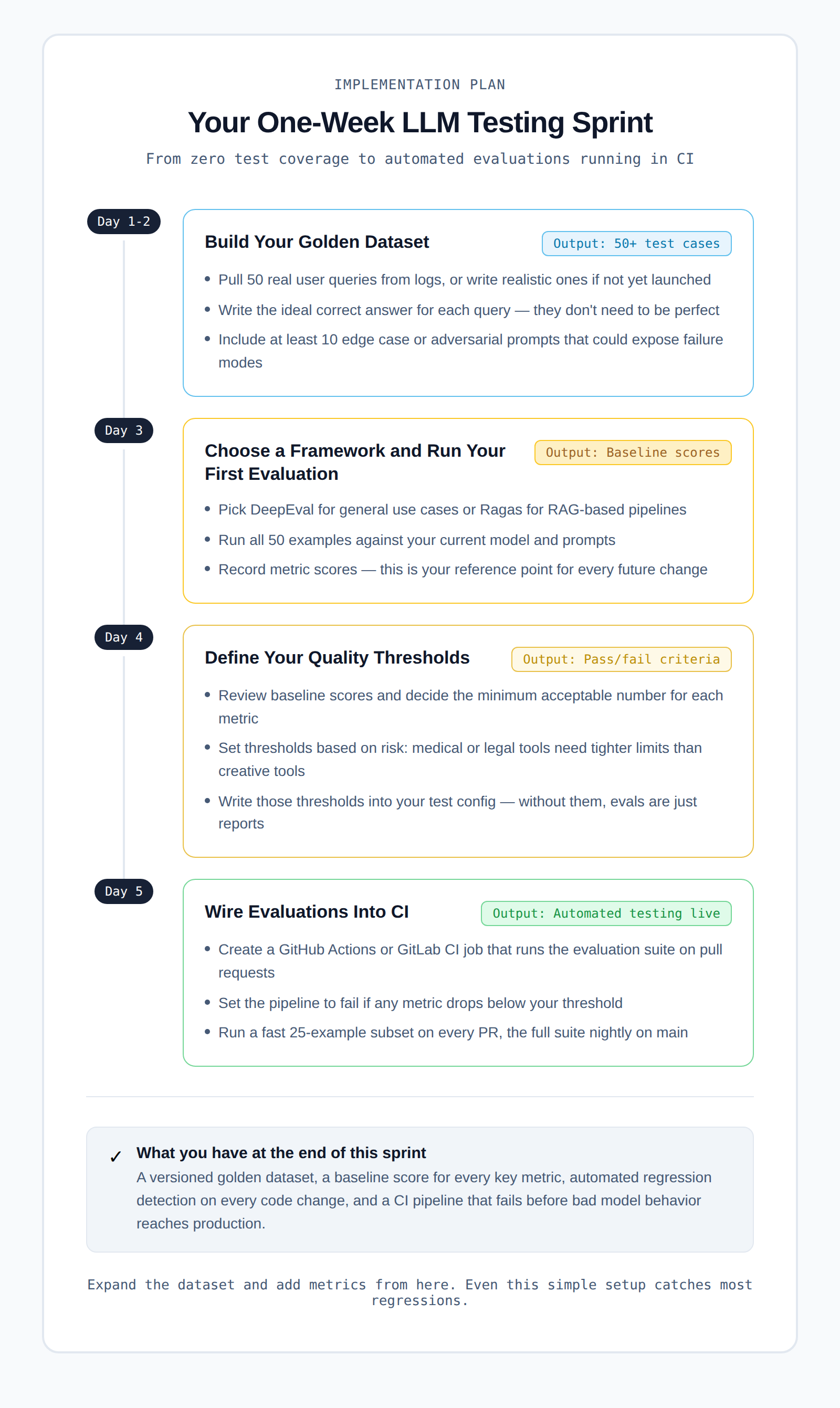
Here is a practical one-week sprint plan that can take you from zero testing to automated evaluations running in CI.
Day 1–2: Build Your Initial Dataset
Start by creating a small test dataset.
1. Collect about 50 real user queries.
- If your product is already live, pull them from user logs.
- If not, write realistic questions that users are likely to ask.
2. For each question:
- Write the ideal correct answer.
3. The answers do not need to be perfect.
- They only need to help you identify when the model gives a clearly wrong response.
4. Even 50 good examples can reveal many common failure patterns.
Day 3: Choose a Framework and Run Your First Evaluation
Next, choose a testing framework.
1. Popular options include:
2. Pick the one that best fits your use case.
3. Then run your 50 test examples against:
- Your current model
- Your current prompts
4. After running the evaluation:
- Record the baseline scores.
These baseline scores will become your reference point whenever you change prompts, models, or system logic.
Day 4: Define Your Quality Thresholds
Now look at the evaluation scores.
1. Decide the minimum acceptable score for each metric.
2. For example:
- Answer relevancy
- Faithfulness
- Accuracy
3. Add these thresholds to your test configuration.
This step is important because:
- Without thresholds, evaluations are only reports.
- With thresholds, they become real tests that can fail.
Many teams skip this step, but it is what makes the testing process meaningful.
Day 5: Connect the Tests to CI
The final step is to automate the evaluation.
- Create a GitHub Actions or GitLab CI job.
- Run the evaluation suite automatically on pull requests.
- Configure the pipeline to fail if any metric falls below the threshold.
A simple setup could look like this:
Once this is connected to your CI pipeline:
- Every code change will automatically run the evaluation.
- The system will alert you if quality drops.
At this point, you already have automated LLM testing in CI.
From here, you can gradually improve the system by:
- Expanding the dataset
- Adding more metrics
- Testing more edge cases
Even this simple setup can catch most regressions before they reach production.
What LLM Evaluation for Enterprises Looks Like at Scale
Running LLM tests with 50 examples in CI works well for early prototypes. But when a company operates multiple AI features across a large engineering team, the testing requirements become much more complex.
Below are the key areas enterprise teams need to focus on.
1. Auditability Is Essential
Large organizations, especially in regulated industries, must keep detailed records of their testing process.
1. Teams need clear answers to questions such as:
- What tests were run?
- What were the evaluation scores?
- What actions were taken when scores dropped?
2. Every evaluation run should be stored with:
- Timestamps
- Model versions
- Prompt versions
- Dataset versions
These records should be treated like test logs, not temporary output. They may be required during compliance reviews or internal audits.
2. Test Your Model Provider, Not Just Your Code
LLM providers often update their models in the background.
1. These updates can change:
- Response quality
- Formatting behavior
- Model reasoning patterns
2. Your code might stay the same, but the model behavior can still change.
To detect this:
- Run canary evaluations on a regular schedule.
- These tests should run directly against the live API.
- If performance changes unexpectedly, the system should alert the team.
This helps identify when an issue comes from the model provider rather than your application.
3. Manage Evaluation Cost at Scale
Running large evaluation suites requires many API calls to your LLM provider.
- This can become expensive when done frequently.
A practical approach is to create a tiered evaluation system:
1. Fast CI tests
- Run a small subset of tests (about 25–50 examples)
- Trigger on every pull request
2. Full evaluation suite
- Run hundreds or thousands of tests
- Trigger nightly or on main branch merges
This approach keeps:
- CI pipelines fast
- Evaluation costs under control
- Test coverage strong
4. Protect Sensitive Test Data
Many teams build their golden datasets using real user queries.
These datasets often contain:
- Customer questions
- Internal product information
- Sensitive business data
Because of this, your evaluation system must follow the same rules as your production systems.
- Apply proper access controls
- Follow data handling policies
- Ensure sensitive data is protected
This is an area many teams overlook until they face a security audit or compliance review.
Where Test Reporting Fits Into Your AI Testing Stack
There is something that people do not talk about enough in the AI and LLM testing space. Most AI features are not standalone systems. They are part of a larger application that already has traditional software tests.
These tests often include:
- Playwright tests for the user interface
- Integration tests for APIs
- Unit tests for business logic
When an AI feature causes a problem, the failure usually appears inside these tests, not in your LLM evaluation suite.
For example:
- The model returns a response in an unexpected format.
- The UI cannot parse the response correctly.
- A Playwright test fails.
Now the team has to investigate.
- Is this an AI output issue?
- Is it a front-end bug?
- Is something broken in the integration layer?
Teams can easily spend 30 to 45 minutes tracing the root cause. This is where TestDino becomes useful.
TestDino automatically classifies Playwright test failures into clear categories.
For teams building AI-powered features, faster failure analysis is very important.
- LLM outputs are not deterministic.
- Debugging issues is already more complex than traditional software bugs.
- Slow test reporting only adds more friction to the process.
TestDino helps remove that friction by making test failure analysis faster and clearer.
You can connect TestDino to your existing Playwright setup in a few mintues. Check the integration guide to see how it works.
Questions to Ask Before You Buy AI/LLM Testing Services
If you're evaluating vendors for AI/LLM testing services rather than building in-house, here's what actually matters.
1. Does it support your model?
- Not all testing platforms support every LLM provider.
- Make sure the service works with OpenAI, Anthropic, Google Gemini, or whatever you're using, including self-hosted open-source models if that's part of your stack.
2. Can you define custom metrics?
- Generic accuracy scores are fine for prototypes.
- Production systems in specific industries (healthcare, legal, finance) need custom correctness definitions.
- If the platform doesn't let you write your own metrics, you'll outgrow it fast.
3. How does it handle your data?
- Your test prompts may contain proprietary business information or sensitive user data.
- Ask specifically about data retention, how prompts and responses are stored, and whether they're used for training.
4. What does the CI integration look like?
- You want evaluations running automatically, not something your QA team triggers manually once a week.
- Ask to see the GitHub Actions or GitLab CI integration before you commit.
5. Can it scale with you?
- Running 100 evaluations daily is different from running 10,000.
- Ask about API rate limits, latency at scale, and cost per evaluation run.
Conclusion
AI features are powerful but unpredictable, and what works in development can easily fail in production without proper testing. Most issues like hallucinations, format errors, latency spikes, and silent quality drops come from testing gaps, not bad code.
Alphabin helps teams build a structured testing approach with better workflows, reliable evaluations, and faster debugging across AI and traditional systems. AI/LLM testing services are now essential for building production-ready systems, and investing early makes it easier to scale and earn user trust.
FAQs
1. What are AI/LLM testing services?
AI/LLM testing services help teams evaluate and monitor the performance of AI models in real-world conditions. They go beyond manual prompt testing by using automated test cases, measurable metrics, and continuous evaluation to ensure reliability.
2. Why is manual prompt testing not enough?
Manual testing only checks a few scenarios and depends on human judgment. It does not scale and cannot catch regressions. LLM behavior can change over time, so without automated testing, teams cannot reliably detect issues.
3. What is a golden dataset in LLM testing?
A golden dataset is a collection of real or realistic user queries paired with ideal answers. It is used as a benchmark to evaluate model performance and detect when output quality drops.
4. How often should LLM evaluations run?
- A small test set should run on every pull request
- A larger evaluation suite should run daily or on major updates
- Canary tests should run regularly to monitor model provider changes
This ensures both speed and coverage.
5. What are the most important metrics in LLM testing?
The key metrics include:
- Accuracy: how correct the answers are
- Faithfulness: whether responses stick to the provided data
- Relevance: how well answers match the question
- Latency: response time under real usage
- Safety: resistance to harmful or adversarial inputs
These metrics together give a complete picture of model performance.


.svg)


.svg)

.png)
.png)



.svg)